

Most smart lock product pages give a single battery life figure, such as “up to 12 months.” In practice, the real number depends on which features your lock has, how often the door is used and what batteries you put in.
Here is what actually decides how long the batteries last, and how to set realistic expectations.
Why Real Life Differs from the Spec Sheet
Battery life figures are measured under test conditions: a set number of uses per day, room temperature and default settings. Your home is different. More users, more remote features and a cold front door all shorten the result.
Treat the stated figure as a best case, not a promise. A lock used by a busy family with every feature switched on will need new batteries sooner than the box suggests.
What Actually Affects Battery Life
1. Features that stay awake
The biggest factor is how much of the lock stays active while it waits. A keypad or card reader sleeps until someone touches it. A lock that keeps a remote connection, watches for faces or records video has to stay partly awake all the time.
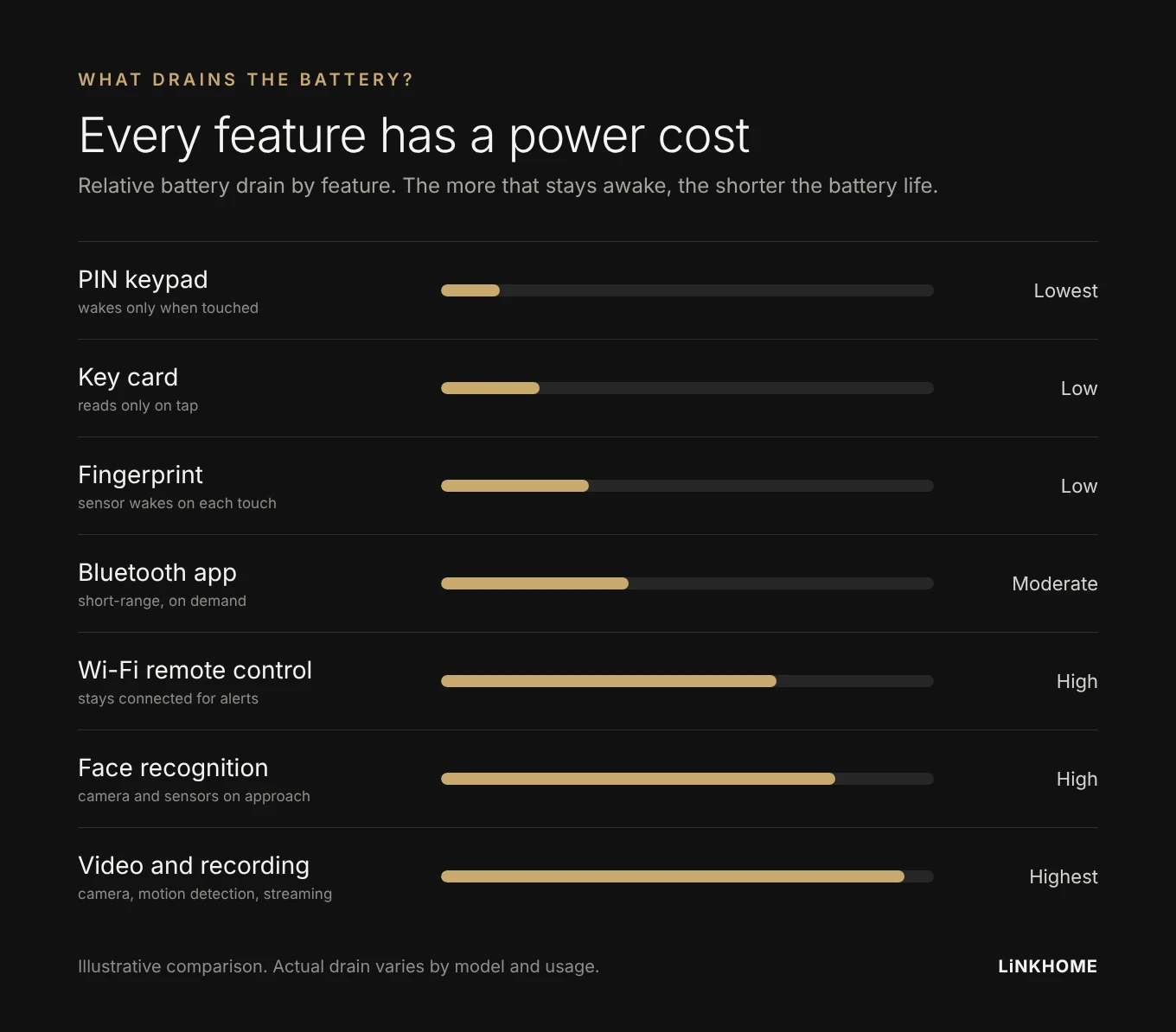
- PIN, card and fingerprint: power is used mainly at the moment of entry
- Bluetooth app: connects on demand when your phone is nearby
- Wi-Fi remote control: keeps a connection open for alerts and remote unlocking
- Face recognition and video: cameras, sensors and image processing switch on whenever someone approaches
That is why feature-rich models often use a rechargeable battery pack instead of standard AA batteries. Check which power source a model uses before you buy.
2. How often the door is used
Every entry runs the motor and the sensors. A busy family home or a shared office uses far more power than a single-person household.
3. Temperature
Cold weather reduces battery performance, and alkaline batteries are especially affected below freezing. Locks on doors exposed to outdoor cold will need new batteries more often.
4. Battery type and quality
Cheap batteries run down faster and are more likely to leak. Always use the type the manufacturer specifies, and replace all batteries at the same time.
Alkaline vs Lithium Batteries
| Alkaline | Lithium (AA) | |
|---|---|---|
| Cost | Lower | Higher |
| Lifespan | Standard | Longer |
| Cold weather | Drops noticeably below 0°C | More stable |
| Warning before empty | Gradual decline, more warning time | Steady, then drops quickly |
| Best for | Indoor, mild climates | Cold or exposed doors |
Check before switching: not every lock is designed for lithium batteries. Use only the battery type listed in your lock’s manual.
Practical Tips to Extend Battery Life
- Turn off features you do not use, such as remote connection, voice guidance or approach sensors
- Use quality batteries of the type the manufacturer specifies
- Replace on a schedule rather than waiting for the warning
- Act on the first low battery alert, not days later
- Keep emergency power at hand, a 9V battery or power bank depending on your model
The Bottom Line
The simpler the lock and the less it stays awake, the longer the batteries last. A PIN or fingerprint lock in a small household can run a long time on one set of batteries. A model with face recognition, video and remote control trades battery life for convenience, which is why many of these use rechargeable packs.
Neither is the wrong choice. Match the features to how you actually use your door, and plan for the maintenance that comes with them.
Looking for a reliable smart lock for your market?
LiNKHOME supplies NEXT smart door locks to distributors, builders and brands. See our products or contact us for business inquiries.