

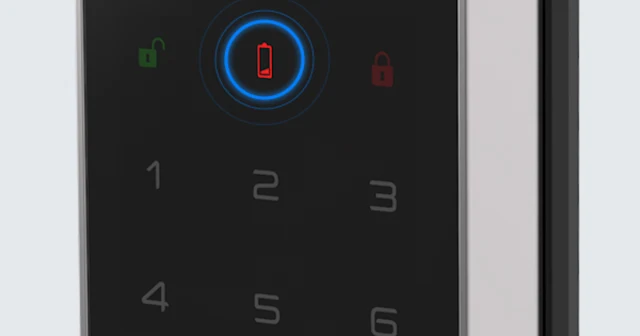
It is one of the first questions people ask about smart locks: what happens if the battery dies? Will you be locked out? Will the door open on its own?
The short answer: if you are prepared, a dead battery is a minor inconvenience, not a crisis. If you are not, it can leave you standing outside your own door. Here is what actually happens, and what to do about it.
You Get a Warning First
Smart locks rarely die without notice. Before the battery runs out, you will usually see one or more of these signs:
- Audible warning: a beep or voice message each time you use the lock
- Display or LED change: a low battery icon or a different light pattern on the keypad
- App notification: a push alert on app-connected models
After the first warning, most locks keep working for a while, typically long enough to replace the batteries if you act within days rather than weeks. How long exactly depends on the model and how often the door is used, so treat the first warning as the signal to act.
What Actually Happens When the Battery Dies
When the battery is fully depleted:
- The keypad, fingerprint and face sensors stop responding
- App-based remote control stops working
- Auto-lock pauses
Important: the door does not unlock on its own. The bolt stays where it was. Locked stays locked, so a dead battery does not create a security gap by itself.
How to Get In When the Battery Is Dead

1. Connect emergency power
Most smart locks have an emergency power terminal on the outside, often a USB Type-C port. Connect a power bank, wait a few seconds for the keypad to wake up, then unlock with your PIN or fingerprint. A small power bank in your bag or car covers most situations.
2. Use the mechanical key
Many models include a hidden key cylinder, usually behind a cover on the outside unit. Keep the backup key somewhere you can reach from outside the home, such as your car or wallet, not inside the house.
3. Replace the batteries
Once you are inside, replace all the batteries at the same time with fresh ones of the type the manufacturer specifies. Mixing old and new batteries shortens battery life.
Which options are available depends on the model, so check your lock’s manual before you need them.
How to Get More Life from Your Battery
| What to do | Why it helps |
|---|---|
| Use quality alkaline batteries | Cheap batteries drain faster and can leak |
| Turn off features you do not use | Remote connection, voice guidance and display brightness all use power |
| Replace on a schedule | Changing batteries before they run low prevents surprises |
| Watch extreme temperatures | Cold weather reduces battery performance |
The Bottom Line
A dead smart lock battery is only a real problem if you are unprepared. Three things to set up now:
- Know your emergency power option and keep a small power bank in your bag or car
- Keep the backup key outside the home if your model has one
- Act on the first low battery warning, not days later
Do those three things, and a dead battery becomes a five-minute task instead of a lockout.
Looking for a reliable smart lock for your market?
LiNKHOME supplies NEXT smart door locks to distributors, builders and brands. See our products or contact us for business inquiries.